Claude Desktop
Overview
The Claude Desktop panel lets you manage Claude Desktop provider configurations in Olenro.
Once enabled, you can:
- Use third-party Anthropic-compatible providers in Claude Desktop
- Configure model mapping for non-Claude models such as DeepSeek, Kimi, DouBao, OpenAI, and Gemini
- Reuse Copilot / Codex OAuth account-based providers
- Switch between Claude Desktop official mode and third-party providers
Claude Desktop and Claude Code are separate app entry points. Claude Code uses ~/.claude/settings.json, while Claude Desktop uses its own 3P profile configuration. In Olenro they appear as separate apps: "Claude" and "Claude Desktop"; the icon badge in the bottom-right corner helps distinguish them.
Support Scope
| Item | Description |
|---|---|
| Supported systems | macOS, Windows |
| Not supported yet | Writing Claude Desktop 3P configuration on Linux |
| Takes effect | Restart Claude Desktop after switching providers |
| Official mode | Uses Claude Desktop built-in sign-in; no API key or endpoint URL required |
| Third-party mode | Writes the 3P profile managed by Olenro |
| MCP / Skills | Claude Desktop 3P profiles do not use Olenro MCP / Skills sync |
Quick Start
Step 1: Open the Claude Desktop Panel
Select Claude Desktop in the app switcher on the left.
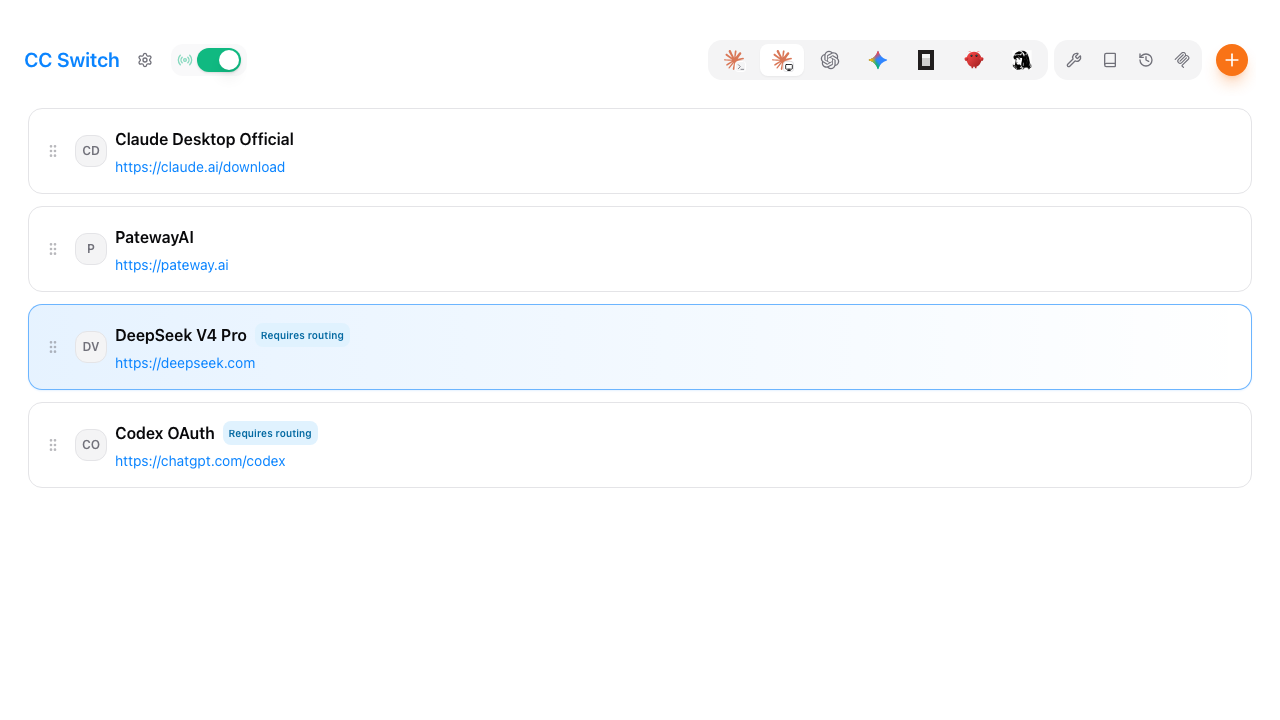
If you do not see this entry, go to:
Settings → General → Homepage Display
Make sure Claude Desktop is not hidden.
Step 2: Import or Add Providers
Recommended: Import from Claude Code
Many users configure providers in Claude Code first, then want to bring the same provider set into Claude Desktop. On first launch, or when entering the Claude Desktop panel for the first time, if no providers exist here, click Import existing providers from Claude Code.
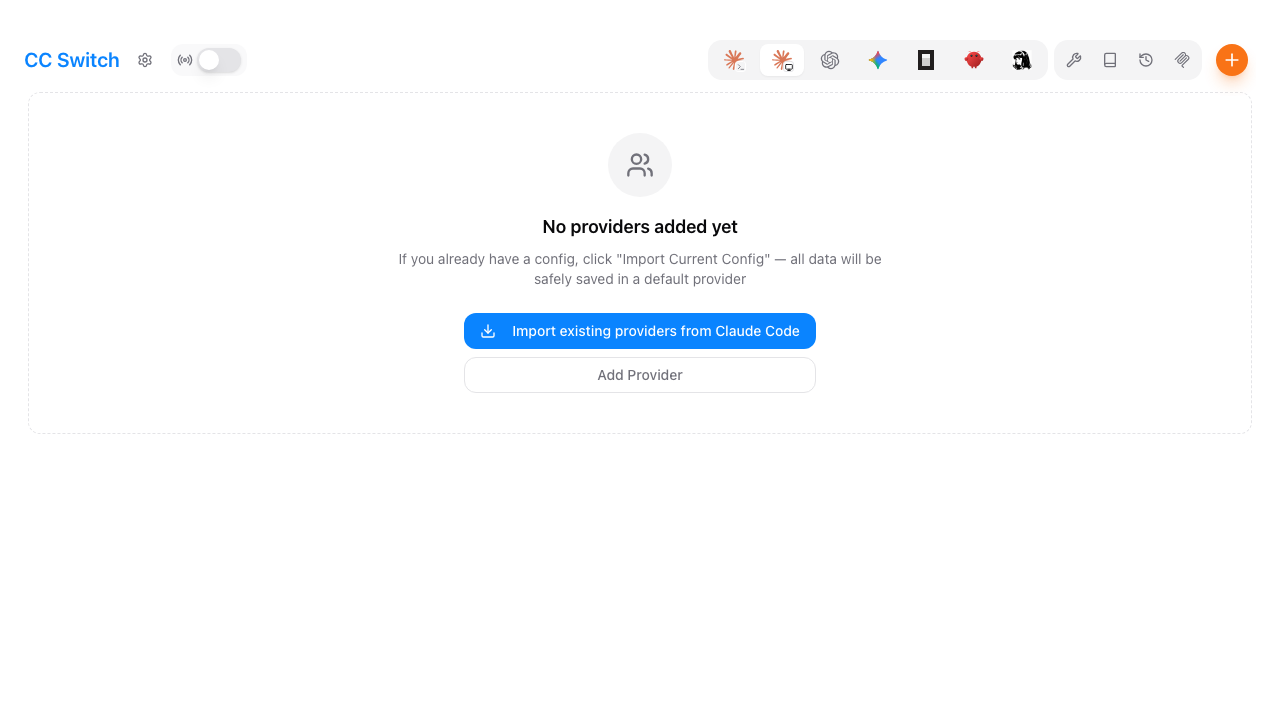
If you already have many providers configured in Claude Code, this one-click import saves you from re-entering endpoint URLs, API keys, and default models one by one.
Import rules:
- Existing providers with the same ID are not overwritten
- Claude Code providers that can connect directly and use safe model names are imported as direct mode
- Providers that need model conversion are imported as model mapping mode when possible
ANTHROPIC_DEFAULT_SONNET_MODEL,ANTHROPIC_DEFAULT_OPUS_MODEL, andANTHROPIC_DEFAULT_HAIKU_MODELare converted into Desktop Sonnet / Opus / Haiku mappings- The legacy
[1M]suffix is converted into thesupports1mflag in the Claude Desktop profile - Providers whose model mapping cannot be inferred are skipped
After importing, review each provider's model mapping against your actual upstream models. Non-Claude models such as Kimi, DeepSeek, GLM, and DouBao usually need model mapping mode.
If you already configured providers in Claude Code, prefer Import existing providers from Claude Code. This is the easiest migration path to Claude Desktop.
If there is nothing to import, or if you want to add a provider only for Claude Desktop, click the + button in the top-right corner.
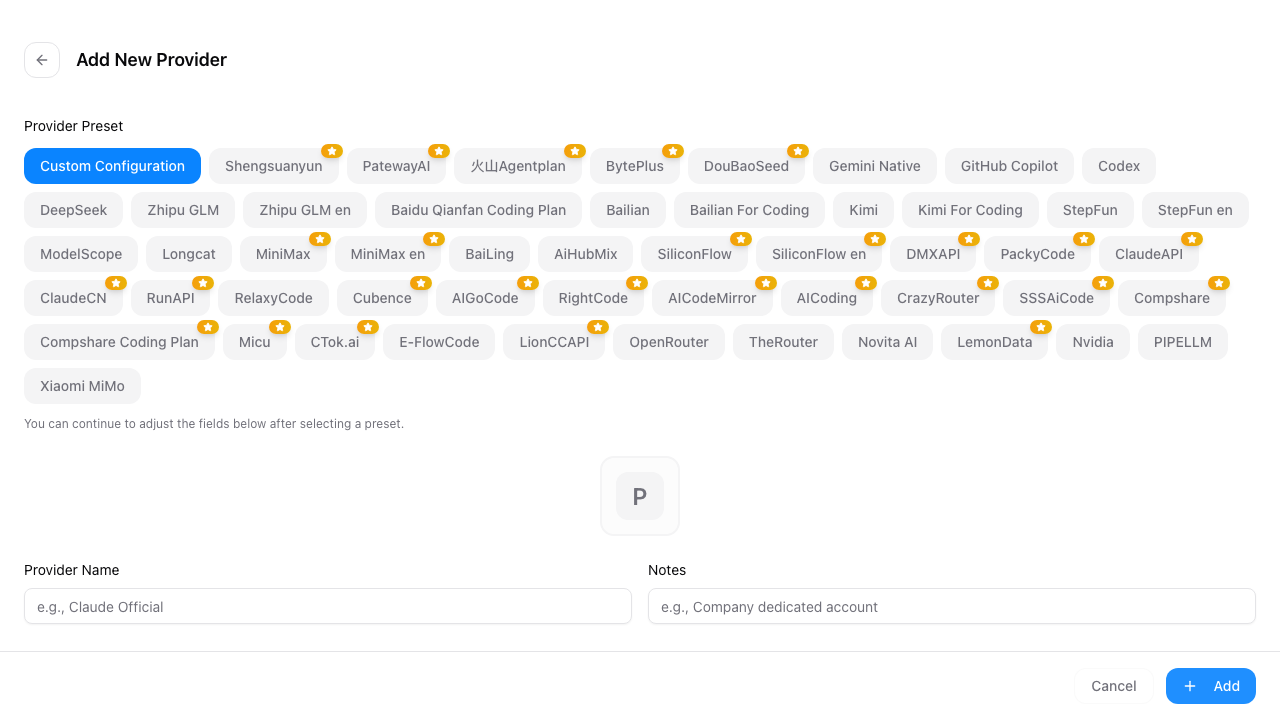
You can choose:
- Preset provider: choose from built-in Claude Desktop presets and fill in only the API key
- Custom configuration: manually enter name, endpoint URL, API key, and model settings
- Claude Desktop Official: restore Claude Desktop official sign-in mode
For ordinary Anthropic Messages API-compatible providers, you usually only need to:
- Choose a preset or custom provider
- Fill in API Key
- Confirm API Endpoint
- Keep Needs model mapping off
- Click Add
Step 3: Switch and Restart Claude Desktop
Click Enable on a provider card.
After switching:
- Direct providers: restart Claude Desktop for the change to take effect
- Providers that need routing: keep Olenro running, turn on Claude Desktop local routing, then restart Claude Desktop
Note: Claude Desktop does not hot-reload configuration like Claude Code. After each provider switch, fully quit and reopen Claude Desktop.
Two Modes
Direct Mode
Direct mode is for providers that already expose the Anthropic Messages API and can be reached by Claude Desktop directly.
In direct mode, Olenro points the Claude Desktop 3P profile to the provider endpoint:
{
  "inferenceProvider": "gateway",
  "inferenceGatewayBaseUrl": "https://api.example.com",
  "inferenceGatewayAuthScheme": "bearer",
  "inferenceGatewayApiKey": "your API key"
}
Use this when:
- The provider exposes native Anthropic Messages API
- Model IDs use
claude-*oranthropic/claude-* - No format conversion is needed
- Olenro local routing does not need to stay running while in use
The "Manually specify Claude Desktop models" option in direct mode is advanced. Most native Claude model providers do not need it because Claude Desktop can fetch /v1/models automatically.
Only fill it in when the provider's /v1/models is unavailable, or when the returned model names cannot be recognized by Claude Desktop.
Model Mapping Mode
Model mapping mode is for providers that expose non-Claude models, such as DeepSeek and Kimi, or when Olenro needs to convert the API format.
After Needs model mapping is enabled, Claude Desktop connects to the Olenro local gateway:
http://127.0.0.1:15721/claude-desktopOlenro handles:
- Exposing safe Claude model routes to Claude Desktop
- Mapping the model role selected in Desktop to the real upstream model
- Converting Anthropic / OpenAI / Gemini request formats as required by the provider
- Using the provider credentials saved in Olenro to call upstream
Supported API formats:
| Format | Usage |
|---|---|
| Anthropic Messages | Native or compatible Anthropic requests |
| OpenAI Chat Completions | OpenAI-compatible /chat/completions |
| OpenAI Responses API | OpenAI Responses-compatible endpoints |
| Gemini Native generateContent | Gemini native API |
In model mapping mode, Claude Desktop only sees claude-* style models. Real upstream model names are not written directly into the Claude Desktop profile.
Configure Model Mapping
Field Reference
| Field | Description |
|---|---|
| Model role | Sonnet / Opus / Haiku route recognizable by Claude Desktop |
| Menu display name | Name shown in the Claude Desktop model menu |
| Requested model | Real upstream model ID sent to the provider |
| 1M | Declares 1M context support to Claude Desktop |
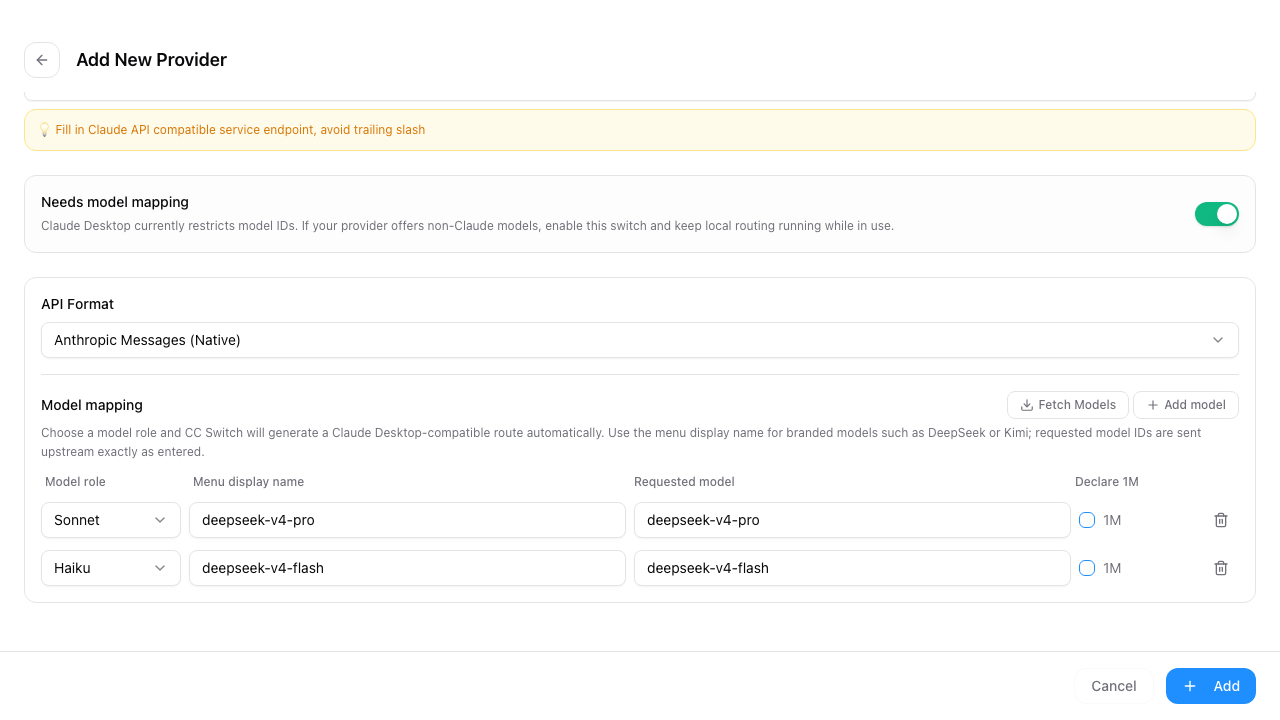
Recommended Setup
For Kimi:
| Model role | Menu display name | Requested model | 1M |
|---|---|---|---|
| Sonnet | Kimi K2 | kimi-k2 | Match provider capability |
For DeepSeek:
| Model role | Menu display name | Requested model | 1M |
|---|---|---|---|
| Sonnet | DeepSeek V4 Pro | deepseek-v4-pro | Match provider capability |
The reason is that Claude Desktop now rejects non-claude-* models, so Olenro local routing performs a model mapping pass.
Multiple Role Mapping
You can configure Sonnet, Opus, and Haiku at the same time:
| Model role | Recommended usage |
|---|---|
| Sonnet | Default main model |
| Opus | Higher quality or complex tasks |
| Haiku | Fast, lower-cost model |
If the provider only has one model, one role is enough. Model mapping mode requires at least one valid mapping.
Local Routing Toggle
Model mapping mode needs Olenro local routing to convert requests. Local routing is powerful but more complex, so the main-page routing toggle is hidden by default to avoid accidental clicks by users who do not need routing. When you need routing, show it manually.
Open:
Settings → Routing → Local Routing → enable Show Routing Toggle on Main Page
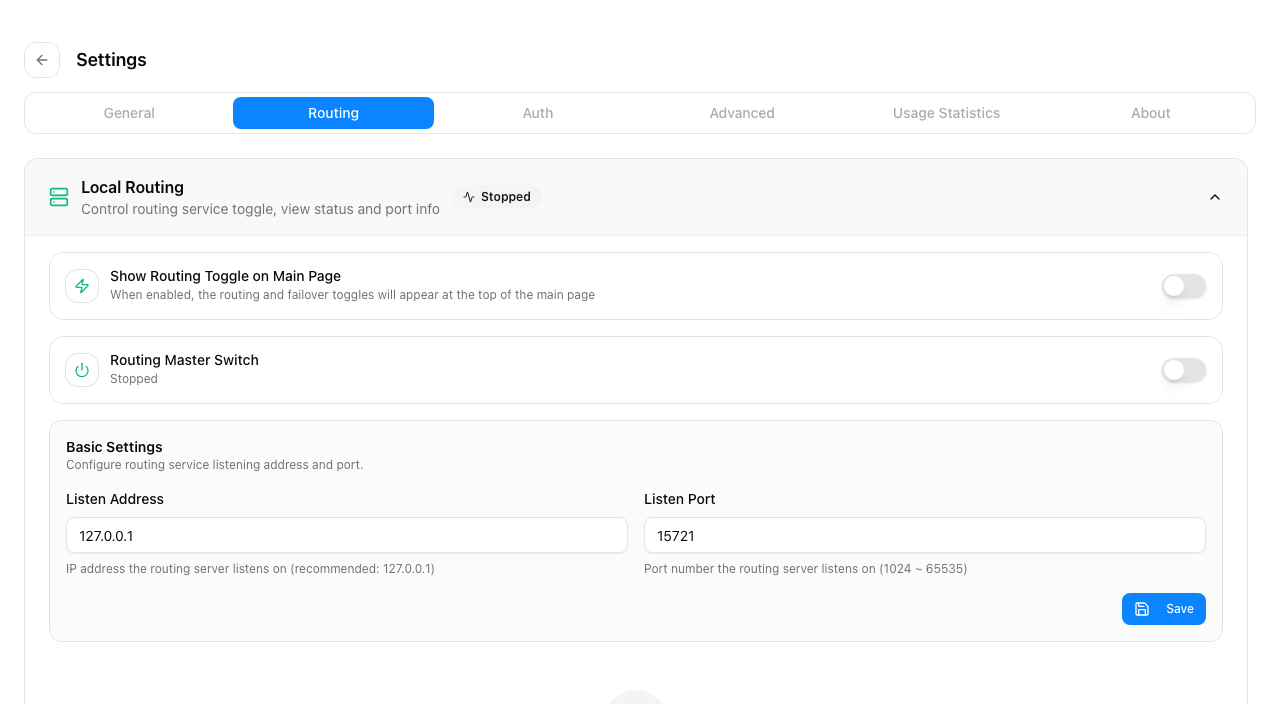
After enabling this display switch, return to the Claude Desktop panel. The Claude Desktop local routing toggle appears in the top-right area of the main page.

Status reference:
| Status | Description |
|---|---|
| On | Local gateway is running, usually at 127.0.0.1:15721 |
| Off | Direct providers still work; model mapping providers cannot work normally |
| Loading | Routing service is starting or stopping |
Only providers with Needs model mapping depend on local routing. Direct providers do not need this toggle.
If another app is using proxy takeover, stopping local routing may be blocked. First disable that app's takeover in the routing service settings, then stop local routing.
Restore Official Claude Desktop
To return to Claude Desktop official sign-in:
- Select Claude Desktop Official
- Click Enable
- Restart Claude Desktop
Olenro restores Claude Desktop's official 1P mode and removes the 3P profile managed by Olenro.
Official mode does not need an API key or local routing.
When importing from Claude Code, Olenro automatically adds Claude Desktop Official.
Configuration File Locations
Olenro writes Claude Desktop 3P configuration files.
macOS
~/Library/Application Support/Claude/claude_desktop_config.json
~/Library/Application Support/Claude-3p/claude_desktop_config.json
~/Library/Application Support/Claude-3p/configLibrary/_meta.json
~/Library/Application Support/Claude-3p/configLibrary/00000000-0000-4000-8000-000000157210.json
Windows
%LOCALAPPDATA%\Claude\claude_desktop_config.json
%LOCALAPPDATA%\Claude-3p\claude_desktop_config.json
%LOCALAPPDATA%\Claude-3p\configLibrary\_meta.json
%LOCALAPPDATA%\Claude-3p\configLibrary\00000000-0000-4000-8000-000000157210.json
These files are maintained automatically by Olenro. Manual edits are not recommended. If configuration becomes inconsistent, enabling the current provider again usually repairs it.
Status Messages
The Claude Desktop panel may show "Claude Desktop configuration needs attention".
| Message | How to handle |
|---|---|
| Current platform is not supported | Only macOS / Windows currently support writing 3P configuration |
Profile contains non-claude-* model names | Switch to the current provider again, or edit the provider to use model mapping |
| Model mapping is enabled but no valid route exists | Edit the provider and add at least one model mapping |
| Local routing token has not been generated | Switch to the provider again; Olenro will write a new local token |
| Profile URL does not match the current provider | Switch to the current provider again so the profile points to the expected URL |
FAQ
Switched successfully, but Claude Desktop did not change?
Fully quit and restart Claude Desktop. Claude Desktop usually reads the 3P profile on startup and does not hot-reload it after changes.
Model mapping provider request failed?
Check:
- Olenro is still running
- Claude Desktop local routing is enabled
- Provider API key and endpoint URL are correct
- Requested model is filled in the model mapping
- Claude Desktop was restarted after switching providers
Why does my branded model name not appear in the Claude Desktop model menu?
Edit the provider, fill in Menu display name in model mapping, then enable the provider again and restart Claude Desktop.
Why does direct mode fail?
Direct mode requires the provider to expose native Anthropic Messages API and accept Claude-safe model names used by Claude Desktop. If the provider uses OpenAI, Gemini, or non-Claude model IDs, enable Needs model mapping.
Can I close Olenro?
It depends on the mode:
- Direct mode: after Claude Desktop restarts and loads the profile, local routing does not need to keep running
- Model mapping mode: Olenro must keep running, and Claude Desktop local routing must stay on
Are real upstream model names written into Claude Desktop?
Not in model mapping mode. The Claude Desktop profile only stores safe claude-* routes and display names. Real upstream model names stay in the Olenro provider configuration and are mapped when requests pass through the local gateway.